
💐💐 感谢兔子大佬
chaz6chez的协程插件
🐞 简介
🚀🚀 webman-coroutine 是一个 webman 开发框架生态下的协程基建支撑插件
主要实现以下功能:
- 支持
workerman 4.x的 swow 协程驱动能力,兼容workerman 5.x版本自带的swow协程驱动; - 支持
workerman 4.x的 swoole 协程驱动能力,兼容workerman 5.x版本自带的swoole协程驱动; - 实现
coroutine web server用于实现具备协程能力的 web 框架基建 - 支持自定义协程实现,如基于
revolt等
🕷️ 说明
workerman 4.x/5.x驱动下的 webman 框架无法完整使用swoole的协程能力,所以使用CoroutineWebServer来替代webman自带的webServerworkerman 4.x下还未有官方支持的swow协程驱动,本插件提供SwowEvent事件驱动支撑workerman 4.x下的协程能力- 由于配置
event-loop等操作相较于普通开发会存在一定的心智负担,所以本插件提供了event_loop()函数,用于根据当前环境自动选择合适的事件驱动
🪰 安装
通过composer安装
composer require workbunny/webman-coroutine
注: 目前在开发阶段,体验请使用
dev-main分支
# composer require workbunny/webman-coroutine dev-main
./composer.json has been updated
Running composer update workbunny/webman-coroutine
Loading composer repositories with package information
Updating dependencies
Lock file operations: 6 installs, 0 updates, 0 removals
  - Locking composer/semver (3.4.2)
  - Locking psr/http-client (1.0.3)
  - Locking psr/http-factory (1.0.2)
  - Locking psr/http-message (2.0)
  - Locking swow/swow (v1.5.3)
  - Locking workbunny/webman-coroutine (dev-main 3965bb5)
Writing lock file
Installing dependencies from lock file (including require-dev)
Package operations: 6 installs, 0 updates, 0 removals
  - Installing composer/semver (3.4.2): Extracting archive
  - Installing psr/http-message (2.0): Extracting archive
  - Installing psr/http-client (1.0.3): Extracting archive
  - Installing psr/http-factory (1.0.2): Extracting archive
  - Installing swow/swow (v1.5.3): Extracting archive
  - Installing workbunny/webman-coroutine (dev-main 3965bb5): Extracting archive
> support\Plugin::install
> support\Plugin::install
> support\Plugin::install
> support\Plugin::install
> support\Plugin::install
> support\Plugin::install
Create config/plugin/workbunny/webman-coroutine
3 package suggestions were added by new dependencies, use `composer suggest` to see details.
Generating autoload files
12 packages you are using are looking for funding.
Use the `composer fund` command to find out more!
No security vulnerability advisories found.
配置说明
enable : (true/false)是否启用协程webServerport : (int)协程webServer默认端口channel_size : (int)协程webServer默认每个stream的channel容量
🐜 使用
1. swow 环境
- 使用
./vendor/bin/swow-builder安装swow拓展,注意请关闭swoole环境 - 修改
config/server.php中'event_loop' => \Workbunny\WebmanCoroutine\event_loop(),event_loop()函数会根据当前环境自行判断当前的 workerman 版本,自动选择合适的事件驱动- 当开启
swow拓展时,workerman 4.x下使用SwowEvent事件驱动 - 当开启
swow拓展时,workerman 5.x下使用workerman自带的Swow事件驱动 - 当未开启
swow时,使用workerman自带的Event事件驱动
- 当开启
- 使用
php -d extension=swow webman start启动 - webman 自带的 webServer 协程化,可以关闭启动的
CoroutineWebServer
注:
CoroutineWebServer可以在config/plugin/workbunny/webman-coroutine/app.php中通过enable=false关闭启动
通过以下命令启动
php -d extension=swow webman start
启动输出
# php -d extension=swow webman start
Workerman[webman] start in DEBUG mode
----------------- WORKERMAN ------------------------------------
Workerman version:4.1.15          PHP version:8.3.9   Event-Loop:Workbunny\WebmanCoroutine\Events\SwowEvent
----------------- WORKERS ---------------------------------------
proto   user            worker                         listen                      processes    status
tcp     root            webman                          http://0.0.0.0:8217         8             [OK]
tcp     root            monitor                         none                        1             [OK]
tcp     root            push_chart                      none                        1             [OK]
tcp     root            plugin.webman.push.server       websocket://0.0.0.0:8788    1             [OK]
tcp     root            plugin.workbunny.webman-coroutine.coroutine-web-server    http://[::]:8717            2             [OK]
------------------------------------------------------------------------
Press Ctrl+C to stop. Start success.
2. swoole 环境
- 使用
pecl install swoole安装稳定版 swoole 拓展 - 建议不要将
swoole加入php.ini配置文件 - 修改
config/server.php中'event_loop' => \Workbunny\WebmanCoroutine\event_loop(),event_loop()函数会根据当前环境自行判断当前的 workerman 版本,自动选择合适的事件驱动- 当开启 swoole 拓展时,workerman 4.x 下使用 SwooleEvent 事件驱动
- 当开启 swoole 拓展时,workerman 5.x 下使用 workerman 自带的 Swoole 事件驱动
- 当未开启 swoole 时,使用 workerman 自带的 Event 事件驱动
- 使用
php -d extension=swoole webman start启动 - 通过
config/plugin/workbunny/webman-coroutine/process.php启动的 CoroutineWebServer 可以用于协程环境开发,原服务还是 BIO 模式
3. ripple 环境
- 使用
composer require cclilshy/p-ripple-drive安装 ripple 驱动插件 - 修改
config/server.php配置'event_loop' => \Workbunny\WebmanCoroutine\event_loop()自动判断,请勿开启 swow、swoole,'event_loop' => \Workbunny\WebmanCoroutine\Factory::RIPPLE_FIBER手动指定
- 使用
php webman start启动
注:该环境协程依赖
php-fiber,并没有自动hook系统的阻塞函数,但支持所有支持php-fiber的插件
4. 自定义环境
- 实现
Workbunny\WebmanCoroutine\Handlers\HandlerInterface接口,实现自定义协程处理逻辑 - 通过
Workbunny\WebmanCoroutine\Factory::register(HandlerInterface $handler)注册你的协程处理器 - 修改
config/server.php中'event_loop' => {你的事件循环类} - 启动
CoroutineWebServer接受处理协程请求
注:
\Workbunny\WebmanCoroutine\event_loop()自动判断加载顺序按\Workbunny\WebmanCoroutine\Factory::$_handlers的顺序执行available()择先
注:因为
eventLoopClass与HandlerClass是一一对应的,所以建议不管是否存在相同的事件循环或者相同的处理器都需要继承后重命名
自定义协程化
webman-coroutine提供了用于让自己的自定义服务/进程协程化的基础工具
注:考虑到 webman 框架默认不会启用注解代理,所以这里没有使用注解代理来处理协程化代理
1. 自定义进程
假设我们已经存在一个自定义服务类,如MyProcess.php
namespace process;

class MyProcess {
    public function onWorkerStart() {
        // 具体业务逻辑
    }
    // ...
}
在webman/workerman环境中,onWorkerStart()是一个 worker 进程所必不可少的方法, 假设我们想要将它协程化,在不改动MyProcess的情况下,只需要新建一个MyCoroutineProcess.php
namespace process;

use Workbunny\WebmanCoroutine\CoroutineWorkerInterface;
use Workbunny\WebmanCoroutine\CoroutineWorkerMethods;

class MyCoroutineProcess extends MyProcess implements CoroutineWorkerInterface {

    // 引入协程代理方法
    use CoroutineWorkerMethods;
}
此时的MyCoroutineProcess将拥有协程化的onWorkerStart(),将新建的MyCoroutineProcess添加到 webman 的自定义进程配置config/process.php中启动即可
2. 自定义服务
假设我们已经存在一个自定义服务类,如MyServer.php
namespace process;

class MyServer {

    public function onMessage($connection, $data) {
        // 具体业务逻辑
    }

    // ...
}
在webman/workerman环境中,onMessage()是一个具备监听能力的进程所必不可少的方法,假设我们想要将它协程化,在不改动MyServer的情况下,只需要新建一个MyCoroutineServer.php
namespace process;

use Workbunny\WebmanCoroutine\CoroutineServerInterface;
use Workbunny\WebmanCoroutine\CoroutineServerMethods;

class MyCoroutineServer extends MyServer implements CoroutineServerInterface {

    // 引入协程代理方法
    use CoroutineServerMethods;
}
此时的MyCoroutineServer将拥有协程化的onMessage(),将新建的MyCoroutineServer添加到 webman 的自定义进程配置config/process.php中启动即可
协程入门
1. 协程创建
Swow 的协程是面向对象的,所以我们可以这样创建一个待运行的协程
use Swow\Coroutine;

$coroutine = new Coroutine(static function (): void {
    echo "Hello 开源技术小栈\n";
});
这样创建出来的协程并不会被运行,而是只进行了内存的申请。
2. 协程的观测
通过 var_dump 打印协程对象,我们又可以看到这样的输出:
var_dump($coroutine);
打印输出
class Swow\Coroutine#240 (4) {
  public $id =>
  int(12)
  public $state =>
  string(7) "waiting"
  public $switches =>
  int(0)
  public $elapsed =>
  string(3) "0ms"
}
从输出我们可以得到一些协程状态的信息,如:协程的 id 是12,状态是等待中,切换次数是0,运行了0毫秒(即没有运行)。
通过 resume() 方法,我们可以唤醒这个协程:
$coroutine->resume();
协程中的PHP代码被执行,于是我们就看到了下述信息:
Hello 开源技术小栈
这时候我们再通过 var_dump($coroutine); 去打印协程的状态,我们得到以下内容:
class Swow\Coroutine#240 (4) {
  public $id =>
  int(12)
  public $state =>
  string(4) "dead"
  public $switches =>
  int(1)
  public $elapsed =>
  string(3) "0ms"
}
可以看到协程已经运行完了所有的代码并进入dead状态,共经历一次协程切换。
协程实战
多进程和协程执行顺序
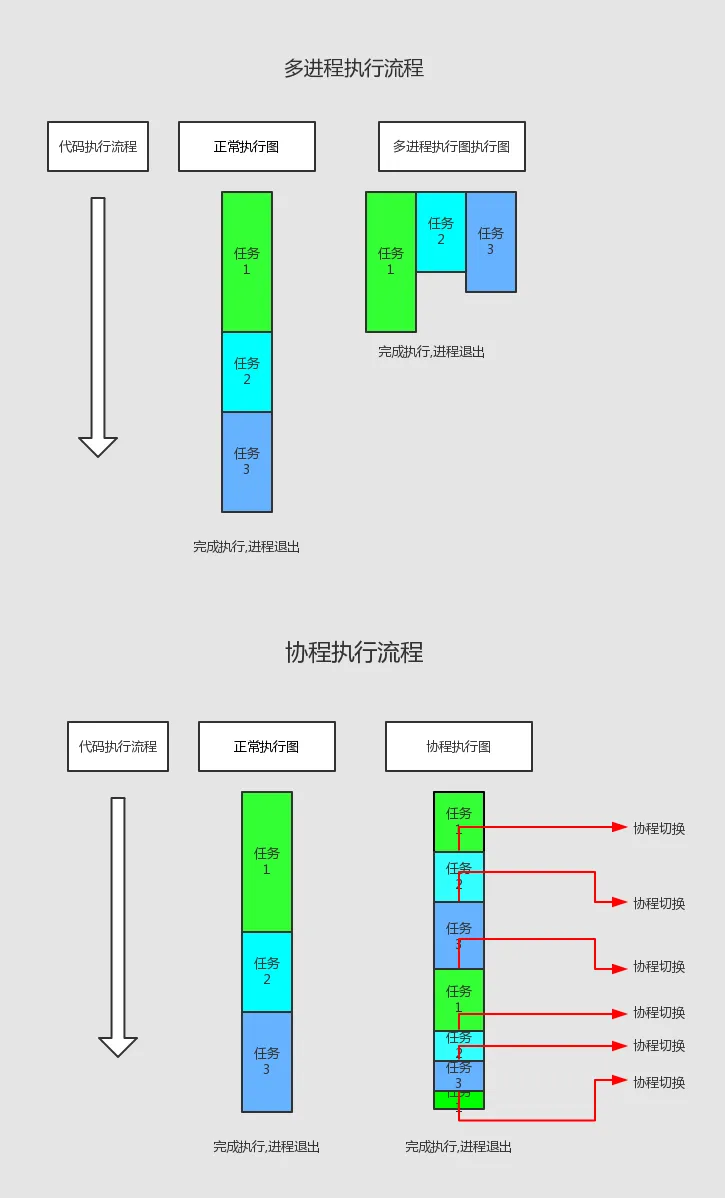
实战伪代码
/** @desc 任务1  */
function task1(): void
{
    for ($i = 0; $i <= 50; $i++) {
        // 写入文件,大概要3000微秒
        usleep(3000);
        echo '[x] [🕷️] [写入文件] [' . $i . '] ' . date('Y-m-d H:i:s') . PHP_EOL;
    }
}

/** @desc 任务2 */
function task2(): void
{
    for ($i = 0; $i <= 100; $i++) {
        // 发送邮件给100名会员,大概3000微秒
        usleep(3000);
        echo '[x] [🍁] [发送邮件] [' . $i . '] ' . date('Y-m-d H:i:s') . PHP_EOL;
    }
}

/** @desc 任务3  */
function task3(): void
{
    for ($i = 0; $i <= 150; $i++) {
        // 模拟插入150条数据,大概3000微秒
        usleep(3000);
        echo '[x] [🌾] [插入数据] [' . $i . '] ' . date('Y-m-d H:i:s') . PHP_EOL;
    }
}
普通请求执行
执行代码
$timeOne = microtime(true);
task1();
task2();
task3();
$timeTwo = microtime(true);
echo '[x] [运行时间] ' . ($timeTwo - $timeOne) . PHP_EOL;
打印结果
[x] [运行开始时间] 1727454935.2908
[x] [🕷️] [写入文件] [0] 2024-09-28 00:21:48
[x] [🕷️] [写入文件] [1] 2024-09-28 00:21:48
[x] [🕷️] [写入文件] [2] 2024-09-28 00:21:48
[x] [🌾] [插入数据] [147] 2024-09-28 00:21:49
[x] [🌾] [插入数据] [148] 2024-09-28 00:21:49
[x] [🌾] [插入数据] [149] 2024-09-28 00:21:49
[x] [🌾] [插入数据] [150] 2024-09-28 00:21:49
[x] [运行时间] 0.93667697906494
可以看出以上代码是
顺序执行的,执行运行时间0.9336秒
[x] [运行开始时间] 1727454935.2908
[x] [运行结束时间] 1727454936.2245
🚀 协程加持执行
执行代码
$timeOne = microtime(true);
echo '[x] [运行开始时间] ' . $timeOne . PHP_EOL;

/** 协程1 */
$coroutine1 = new \Swow\Coroutine(static function (): void {
    task1();
});
$coroutine1->resume();

/** 协程2 */
$coroutine2 = new \Swow\Coroutine(static function (): void {
    task2();
});
$coroutine2->resume();

/** 协程3 */
$coroutine3 = new \Swow\Coroutine(static function (): void {
    task3();
});
$coroutine3->resume();
$timeTwo = microtime(true);
echo '[x] [运行结束时间] ' . $timeTwo . PHP_EOL;
打印结果
[x] [运行开始时间] 1727454795.2326
[x] [运行结束时间] 1727454795.2328
[x] [🕷️] [写入文件] [0] 2024-09-28 00:33:15
[x] [🍁] [发送邮件] [0] 2024-09-28 00:33:15
[x] [🌾] [插入数据] [0] 2024-09-28 00:33:15
[x] [🕷️] [写入文件] [1] 2024-09-28 00:33:15
[x] [🍁] [发送邮件] [1] 2024-09-28 00:33:15
[x] [🌾] [插入数据] [1] 2024-09-28 00:33:15
[x] [🕷️] [写入文件] [2] 2024-09-28 00:33:15
[x] [🌾] [插入数据] [148] 2024-09-28 00:33:15
[x] [🌾] [插入数据] [149] 2024-09-28 00:33:15
[x] [🌾] [插入数据] [150] 2024-09-28 00:33:15
可以看出以上代码是
交叉执行。执行运行时间只需要0.5002秒,而且接口请求没有任何阻塞。
[x] [运行开始时间] 1727454795.2326
[x] [运行结束时间] 1727454795.7328
♨️ 相关文章
💕 致谢
💕感恩 workerman 和 swow 开发团队为 PHP 社区带来的创新和卓越贡献,让我们共同期待 PHP 在实时应用领域的更多突破!!!